Instead of spinning up a collection of random virtual machines and calling it a homelab, I wanted to build something more meaningful - a small enterprise-like environment that resembles how a real corporate network is structured.
I call this the Business-in-a-Box homelab, inspired by the Project Security E101 course. The goal is to simulate a corporate domain network called Project X, complete with internal services, security monitoring, and an attacker node for running controlled offensive exercises.
Think of it as a self-contained training ground for practising both attack and defence in a realistic but isolated environment.
Lab Architecture
The entire environment runs on Oracle VirtualBox using a private NAT network: 10.0.0.0/24.
This setup keeps the lab isolated from the host machine, allows safe execution of offensive tooling, and still permits controlled outbound internet access for updates.
The architecture includes:
- Active Directory infrastructure
- Enterprise workstations
- Security monitoring platforms
- Internal email services
- Offensive security systems
Figure 1 - Overall Homelab Architecture
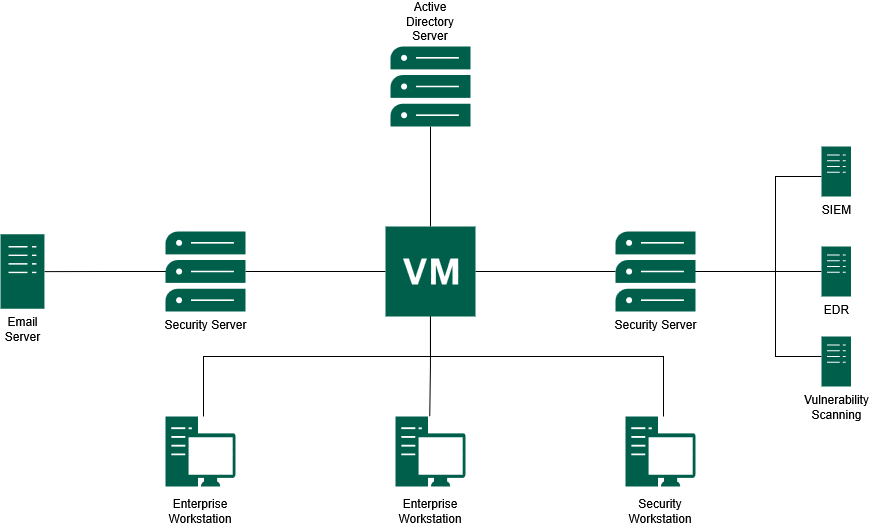
Figure 1 shows the overall structure of the Business-in-a-Box homelab, including the domain controller, enterprise workstations, email server, security server, and monitoring components.
Suggested screenshots to include
- VirtualBox VM list showing all homelab machines
- VirtualBox NAT network configuration
- IP configuration from Windows using
ipconfig - IP configuration from Linux using
ip a - Successful
pingtest between hosts
Virtual Machines
Each VM represents a specific role commonly found in a corporate environment.
| Hostname | IP Address | Operating System | Role |
|---|---|---|---|
| project-x-dc | 10.0.0.5 | Windows Server 2025 | Domain Controller (AD/DNS/DHCP) |
| project-x-corp-server | 10.0.0.8 | Ubuntu Server 22.04 | Jumpbox & Email Server |
| project-x-sec-box | 10.0.0.10 | Ubuntu Server 22.04 | Wazuh SIEM Server |
| project-x-win-client | 10.0.0.100 | Windows 11 Enterprise | Domain Workstation |
| project-x-linux-client | 10.0.0.101 | Ubuntu Desktop 22.04 | Developer Workstation |
| project-x-sec-work | 10.0.0.103 | Security Onion | Network Monitoring Workstation |
| project-x-attacker | 10.0.0.50 | Kali Linux 2024.4 | Attacker Node |
The minimum specifications per VM range from 1 CPU / 2 GB RAM for lighter machines, such as the corporate server and attacker node, up to 2 CPU / 4 GB RAM for heavier systems such as the domain controller, Windows client, and security server.
Suggested screenshots to include
- VirtualBox VM settings for one Windows host
- VirtualBox VM settings for one Linux host
- Hostname configuration screen or terminal output
- VM resource allocation page
Core Services
The homelab uses several core services to make the environment behave like a small enterprise network.
Active Directory
The domain controller is hosted on project-x-dc and runs Windows Server 2025. It provides:
- Active Directory Domain Services (ADDS)
- DNS services
- DHCP services
- Centralised authentication
- Domain policy management
All Windows workstations in the lab are joined to the domain corp.project-x-dc.com. This provides centralised authentication and policy management, similar to what would be found in a real enterprise environment.
Suggested screenshots to include
- Windows Server Manager dashboard
- Active Directory Users and Computers
- DNS Manager showing domain records
- DHCP configuration screen
- Successful Windows domain join screen
- Windows login using a domain account
Linux Domain Integration
To support a mixed operating system environment, the Linux workstation is joined to the Active Directory domain using Samba Winbind.
This allows Linux systems to authenticate using domain credentials and helps simulate a realistic environment where Windows and Linux machines coexist.
Useful validation commands include:
| |
Suggested screenshots to include
realm listoutputwbinfo -ushowing domain usersid <domain-user>output- Winbind service status
- Linux login using domain credentials
MailHog Email Infrastructure
The email infrastructure is powered by MailHog, a lightweight tool that acts as a fake SMTP server. It runs inside a Docker container on project-x-corp-svr and is central to the phishing simulations later in this series.
MailHog replaces the need for a real external email provider. This means email-based attack simulations can remain fully contained inside the lab.
MailHog ports
| Service | Port | Purpose |
|---|---|---|
| SMTP | 1025 | Captures outgoing emails sent by lab scripts or applications |
| Web Interface | 8025 | Allows captured emails, headers, and content to be inspected |
| REST API | N/A | Enables automated interaction for scripted attack scenarios |
Figure 2 - MailHog Email Simulation Workflow
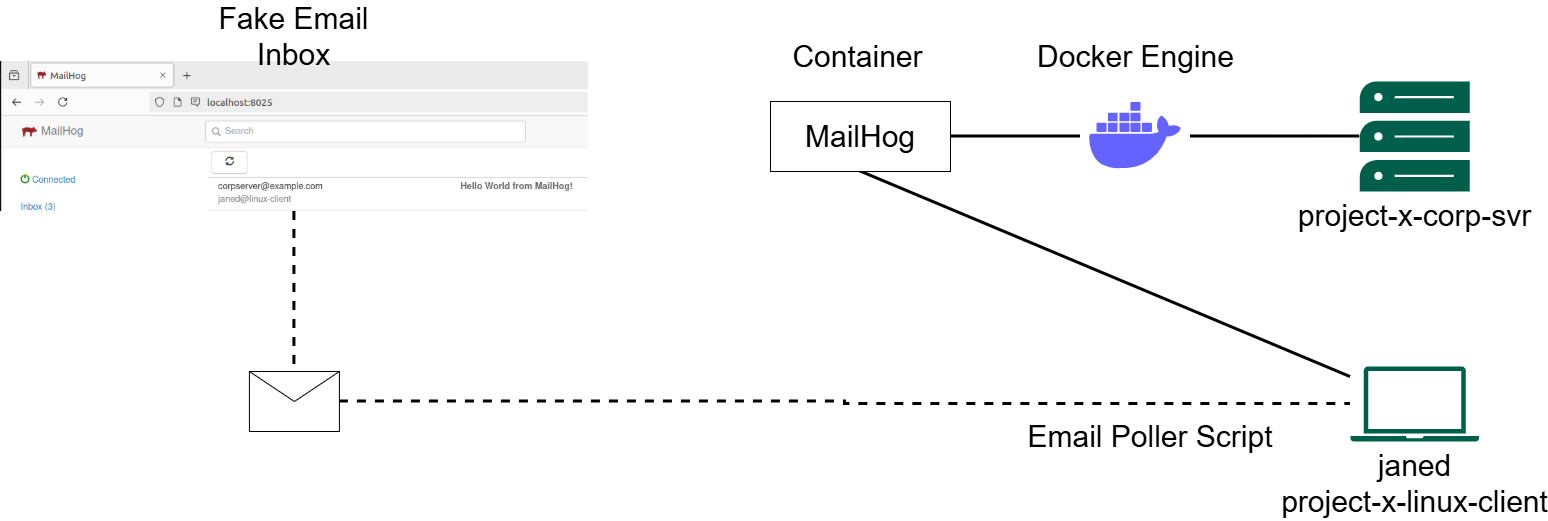
Figure 2 shows how MailHog runs inside Docker on project-x-corp-svr and how the Linux client uses an email poller script to simulate inbox activity.
On the project-x-linux-client side, a dedicated Bash script called email_poller.sh runs in the background and periodically polls the MailHog API to simulate a user checking their inbox. When a new email arrives, the script prints an alert to the terminal.
Suggested screenshots to include
- MailHog web inbox
- Example captured email
- Email headers inside MailHog
docker psshowing the MailHog container- Docker Compose file or MailHog startup command
email_poller.shrunning in terminal- MailHog API response
Security Stack
The defensive side of the homelab is built around Wazuh and Security Onion. Wazuh provides host-based monitoring, while Security Onion provides network-level visibility.
Figure 3 - Security Monitoring and Defence Architecture
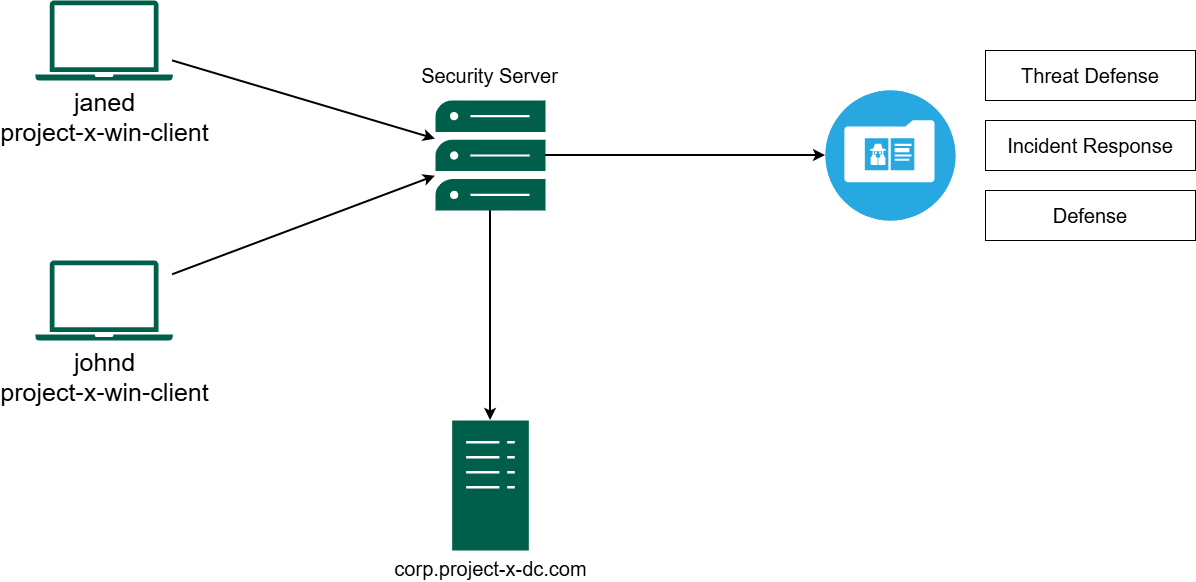
Figure 3 shows how endpoint activity is collected and forwarded into the security server, where it can be used for threat defence, incident response, and defensive analysis.
Wazuh SIEM
Wazuh is the main defensive tool in this homelab. It runs on project-x-sec-box and uses an agent-based model. Lightweight agents are installed on monitored machines and forward telemetry back to the central Wazuh Server.
The three core components are:
- Wazuh Agents - installed on
project-x-win-client,project-x-linux-client, andproject-x-dc. They monitor host-level activity such as system logs, file changes, and rootkit detection. - Wazuh Server - receives all agent data, decodes logs, and runs them against a ruleset library to flag indicators of compromise.
- Wazuh Indexer and Dashboard - stores telemetry data and provides a web interface for visualising alerts and performing forensic investigation.
During attack simulations, Wazuh is used to observe the digital footprint left behind at each stage of the attack lifecycle, from initial access to persistence.
Suggested screenshots to include
- Wazuh dashboard homepage
- Wazuh agent list showing connected hosts
- Security events dashboard
- Failed login detection alert
- File Integrity Monitoring alert
- MITRE ATT&CK mapping page
- Vulnerability detection results
Security Onion
Security Onion runs on project-x-sec-work and complements Wazuh by providing network-level visibility.
While Wazuh focuses on host-based monitoring, Security Onion handles:
- Network Security Monitoring (NSM)
- Packet capture
- Traffic analysis
- Suricata alerts
- Zeek logs
- Threat hunting
This provides visibility across the lab network, even in situations where host-based telemetry is limited or unavailable.
Suggested screenshots to include
- Security Onion dashboard
- Packet capture interface
- Suricata alert view
- Zeek log search
- Traffic analysis view
- PCAP investigation screen
Offensive Environment
The attacker machine, project-x-attacker, runs Kali Linux 2024.4 and is loaded with the tools used throughout the attack simulation.
| Tool | Purpose |
|---|---|
| Hydra | Brute-force password attacks |
NetExec (nxc) | Credential spraying and lateral movement |
| Evil-WinRM | Remote shell access to Windows systems over WinRM |
| XFreeRDP | Remote Desktop Protocol access |
| SecLists | Curated wordlists for credential attacks |
These tools are used only inside the isolated homelab network for controlled security testing.
Suggested screenshots to include
- Kali Linux desktop or terminal
- Hydra brute-force output
- NetExec credential spraying output
- Evil-WinRM shell access
- XFreeRDP session to Windows workstation
- Wazuh alert generated from offensive activity
Test Credentials
Weak credentials are intentionally configured throughout the lab to make the attack simulation possible. These credentials are for homelab use only.
Important: Do not use these credentials outside the lab. They are intentionally weak and should never be reused in real systems.
| Account | Password | Host |
|---|---|---|
Administrator | @Deeboodah1! | project-x-dc |
johnd@corp.project-x-dc.com | @password123! | project-x-win-client |
jane@linux-client | @password123! | project-x-linux-client |
sec-user@sec-box | @password123! | project-x-sec-box |
attacker | attacker | project-x-attacker |
Conclusion
This completes the foundational setup of the Business-in-a-Box cybersecurity homelab. The environment now includes a domain controller, enterprise workstations, internal email infrastructure, security monitoring platforms, and an attacker node.
In Part 2, I will deliberately misconfigure several services across the lab to create a realistically vulnerable environment and connect those activities into Wazuh for detection.